Navigation | NavXSim Product

See More.
Avoid More.

Fully functional Radar and ARPA simulator. Detect and track targets with high accuracy, compute CPA/TCPA for every vessel, and practice collision avoidance decisions in all weather and visibility conditions.

Watch the Demo

Watch the Radar / ARPA Simulator in Action

A walkthrough of target acquisition, CPA/TCPA tracking, all-weather conditions, and AI-driven fault injection inside the simulator.

Product Overview

What is Radar / ARPA Simulation?

NavXSim's Radar/ARPA simulator replicates ship's radar with full ARPA functionality. Trainees practice target acquisition, tracking, CPA and TCPA computation, and correct collision avoiding action per COLREG rules โ€” in fog, rain, sea clutter, and night conditions. Integrated with Bridge Simulation for full multi-equipment training.

๐Ÿ“ก

Target Detection & Tracking

Detect and track up to 40 simultaneous ARPA targets. CPA and TCPA computed in real time for each vessel.

๐ŸŒง๏ธ

All-Weather Conditions

Train in rain clutter, sea clutter, fog, and night conditions. Gain, sea clutter, and rain clutter controls fully functional.

โš ๏ธ

Collision Risk Alerts

CPA below 1.0 NM triggers collision warning. Practice correct avoiding action per COLREG Rules 8, 16, and 17.

๐Ÿ“Š

Performance Analytics

Every radar decision logged. Correct and incorrect avoiding actions scored. AI debrief generated post-session.

Radar / ARPA

ARPA ON ยท CPA/TCPA alerts ยท All-weather radar simulation

40+
Simultaneous Targets
91%
Communication Score
93%
Situational Awareness
0
Internet Required
Inside the Simulator

See Every Capability in Action
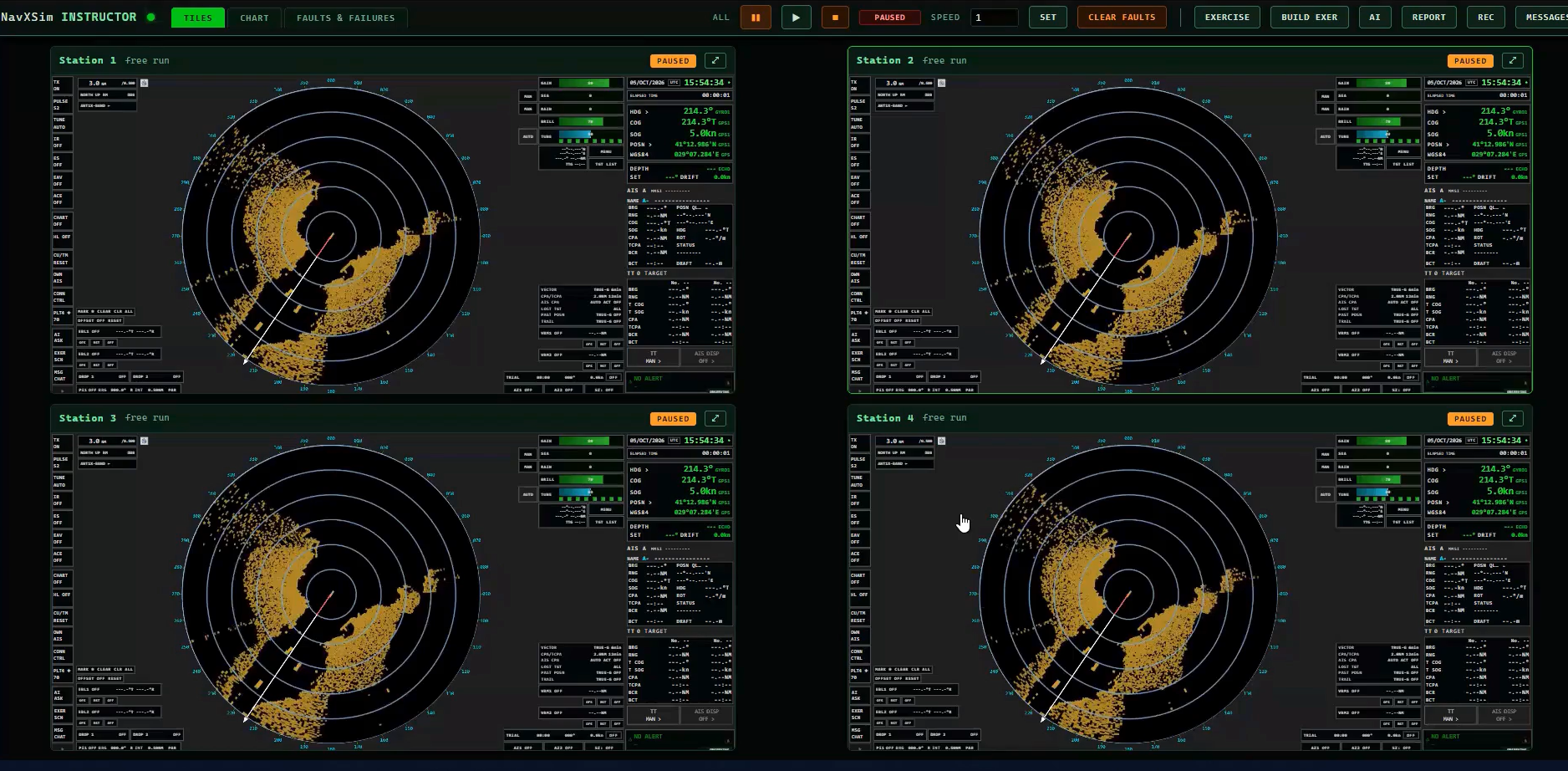
Instructor console monitoring multiple trainee radar stations

Centralized Instructor Console

A centralized instructor console provides real-time monitoring of all trainee radar stations from a single screen. Instructors can view each trainee's radar picture, exercise status, targets, alarms, and equipment condition, with one-click full-screen access to any station.

The console enables instructors to pause/resume individual stations or the entire class, configure environmental conditions, and inject realistic radar, ARPA, navigation, and sensor faults during an exercise. Faults can be triggered manually or scheduled against the exercise timeline, allowing different trainees to experience different scenarios.
Multi-station monitoringLive radar viewFault injectionEquipment & sensor failuresEnvironmental controlsScheduled faultsIndividual station controlSTCW-aligned training support
Tactical chart with live vessel and AIS contact control

Live Tactical Chart & Traffic Management

A powerful tactical chart provides instructors with a real-time view of the exercise area, including own ship, target vessels, AIS contacts, and planned traffic routes. Instructors can create, edit, assign, and control vessel routes directly on the chart, with support for single-run, shuttle, and reverse movements.

Vessels can be positioned, renamed, and dynamically controlled for speed, heading, and course, while targeted faults such as AIS failures, SART events, false echoes, and other scenarios can be applied to individual contacts.

The exercise environment can be saved and deployed to all trainee stations simultaneously, including vessels, routes, environmental conditions, timed faults, briefing instructions, and scoring objectives.

Tactical chartRoute & traffic managementLive vessel controlReal & ghost AIS targetsTargeted fault injectionContact monitoringExercise creation & deploymentReal charted coastlinesSTCW-aligned simulation facilities
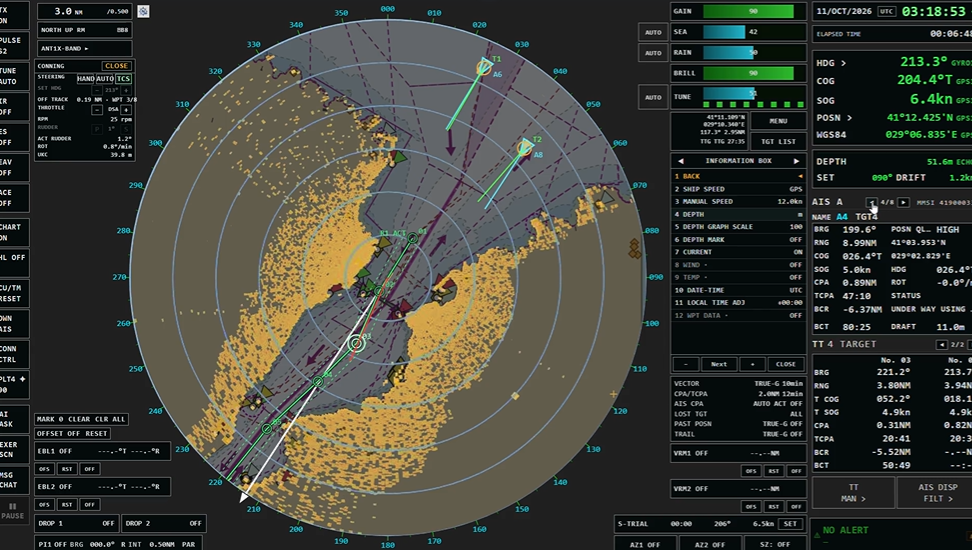
FAR-2218 style radar and ARPA trainee station

FAR-2218 Radar & ARPA Simulator Station

A true-to-operation radar simulator replicates the Furuno FAR-2218 interface, controls, menus, and operating workflow, enabling trainees to build skills that transfer directly to real onboard equipment. The browser-based station requires no software installation โ€” trainees simply log in and begin the exercise.

The station provides complete ARPA and AIS functionality, including target acquisition and tracking, CPA/TCPA, bow crossing data, alarms, target lists, and detailed target information. Advanced radar tools include dual EBLs and VRMs, parallel indexing, offset centre, trails, past positions, and relative/true motion with sea- and ground-stabilisation. Integrated conning controls allow trainees to operate the vessel through telegraph, rudder, rate of turn, and under-keel clearance, with realistic vessel response.

Exercise objectives remain visible throughout the session, while trainees manage radar settings, environmental clutter, and injected equipment faults. An AI training assistant provides on-demand radar guidance and theory support, followed by an automated scored debrief highlighting performance, objectives achieved, alarms, navigation decisions, and areas for improvement.

FAR-2218-style radarFull ARPAAISAdvanced measurementsTrue/relative motionSea/ground stabilisationIntegrated conningRealistic vessel responseFault diagnosisLive exercise objectivesAI assistantAutomated scoring & debrief
How It Works

From Setup to Real Results

01

Configure Radar Scenario

Select traffic density, visibility, weather, and sea state. Set CPA alarm thresholds matching real vessel parameters.

02

Detect and Track Targets

Trainee acquires targets, monitors CPA/TCPA, identifies collision risks, and takes correct avoiding action per COLREGs.

03

AI Debrief Report

All decisions reviewed against COLREG requirements. Incorrect actions explained. Competency certificate generated.

Also Explore

Related Products

Ready to Train Radar Competency at Scale?

Book a demo and see how NavXSim delivers ARPA certification faster and at lower cost.

info@navXSims.com  |  www.navXSims.com  |  www.nextdrona.com